|
Technical Architecture Overview
The technical architecture for the HOC application emphasizes reliability, flexibility and maintainability. This report details the various characteristics, architectures, patterns and technologies that will be used for the application.
Significant Characteristics
The significant characteristics of the system are as follows:
- Follows an n-tier model. The "n" of n-tier derives from breaking down the middle tier (for thin client presentation logic, business logic, and infrastructure services) into a number of logical sub-tiers. This decomposition is driven by business requirements such as factoring reusable logic into a separate layer apart from client presentation-dependent logic, and by system requirements such as clustered processes and geographically distributed system nodes.
- System will be developed to support a high-availability environment. Typically guaranteed system availability during working hours would be satisfactory, but in this case working hours are extended. Certain design principals must be followed so that clustering and failover can be utilized.
- Leverages the Microsoft .net architecture. Extensive use of Microsoft Windows 2000 Server and ASP.net. Additional key technology choices include the Sun/Solaris server platform and Oracle 8i (8.1.7) relational database. Development languages are as follows:
- ASP.net : VB.Net
- Business Objects: VB.Net
- Implements core business logic and infrastructure services in middle-tier servers. These components facilitate reuse across multiple clients and client technologies on a services basis, rather than a code library basis. Components are factored into vertical interfaces (specialized for an application service) and horizontal interfaces (generalized for use across applications or other services).
- Core business logic and application-specific infrastructure processes are designed and implemented, wherever possible, as either services or frameworks. Services are cleanly partitionable, cohesive sets of functionality. They have a well-defined public interface, and typically have a network-based communications protocol central to that interface.
- Data entities with no need for closely coupled encapsulation with a set of operations, or which involve fundamentally file-oriented information, are represented as record sets or structured information in a technology neutral format such as XML. The record and file format specifications are another form of stabilizing interface.
Technology Overview
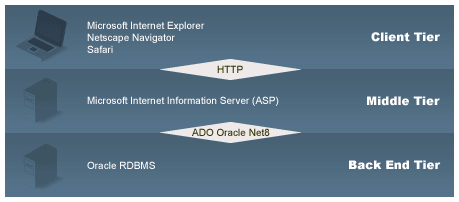
The following diagram summarizes the main elements of the system's processes and technologies. Some of the elements are discussed in further detail.
Client Tier
The client tier shows the application clients that must be supported by the architecture. Currently the client consists of a Web browser. Internet Explorer 5+ must be supported. This application leverages extensive ASP.NET Webforms controls, therefore, extensive use of client-side javascript is used.. The application will also be developed for a screen resolution of 1024 x 768.
Intranet/Internet
It can be assumed that intranets consist of high quality, secured network connections. As such, they do not need to secure data transferred over the network. Internet clients will VPN into the network (which is already secure).
Middle Tier
The middle tier consists of the largest number of architectural elements, including most of the application business logic. Because of this, it can be subdivided into a number of sub-tiers (or layers). These layers will house the specific module, as well as general infrastructure classes or services.
The middle tier layers include:
- Web layer
- Application layer
- Infrastructure layer
Microsoft Technologies
Active Server Pages (ASP.net)
Active Server Pages technology provides a simplified, fast way to create dynamic Web content. ASP technology enables rapid development of Web-based applications that are server and platform independent. ASP pages separate the user interface from content generation, enabling designers to change the overall page layout without altering the underlying dynamic content. They take advantage of objects, simplifying the maintenance of Web applications.
Extensible Markup Language (XML)
Extensible Markup Language (XML) is the universal format for data on the Web. XML allows developers to easily describe and deliver rich, structured data from any application in a standard, consistent way.
Internet Information Server (IIS)
The Microsoft® Internet Information Server is designed to deliver high speed, secure information publishing while also serving as a platform for developers and independent software vendors (ISVs) to extend the Internet's standard communication capabilities.
.net Assemblies
An assembly is a versioned, self-describing encapsulation of a set of resources. Assemblies can reference other assemblies to build complex business objects, much in the same way as dlls, and COM executables did in the past.
We will be utilizing assemblies to encapsulate various aspects of the HOC application. For example, assemblies will be created for Security, Incident, and Action Items.
Active Data Objects (ADO.net)
ActiveX Data Objects is a programming model, which means that it is not dependent upon any given back-end engine. ADO.NET can access data through any OLE DB provider, although ADO.Net drivers are specific to database
Oracle
The Oracle Provider for ADO.NET is currently available for the Windows operating system. The provider allows high performance and reliable access to Oracle databases for .NET applications. Additionally, the provider allows access to Oracle-specific features, including PL/SQL stored procedures and LOBs. The goal of the Oracle Provider for ADO.NET is to have a high performance and rich feature mechanism for data access to Oracle databases.
Architecture Componants
Client Tier
Services in the client tier are typically related to delivery of functionality and information to system users. Client services therefore are most commonly packaged in applications of one type or another, such as Web-based applications, stand-alone software or wireless applications. Increasingly with Web-based systems, another class of client services provides integration interfaces to other systems within the company or in external companies. In this case, the services do not have direct end users, and so typically have no presentation component.
Browser Client
The browser client, typically but not necessarily limited to Netscape or Internet Explorer, is suitable for delivering primarily static information and multimedia via browser plugins. It can also deliver ultra-thin client applications, i.e., those essentially involving only presentation running in the client, with all application logic located server-side. This model is employed currently for the HOC Application. The services of the browser are therefore oriented towards user interface presentation, HTML-based information display, multimedia playback, and other browser functions such as bookmarks.
Browser plugins such as the Adobe Acrobat Reader, Macromedia Flash player or Real Networks RealAudio G2 player, can extend the media types supported by the browser. However, application behavior will still be restricted to the rendering of static, non-interactive media and simple user interface (UI) interactions, based on HTML forms and controls such as check boxes, pop-up lists and buttons. There are numerous browser compatibility issues to deal with. These increase the cost of development and support as the interface grows more complex and more browser versions must be supported.
Application Client
The application client is a freestanding application developed in any appropriate programming language. It can range from a lightweight presentation layer using mainly server-side processing and data, to complex functionality and client-side services that primarily use server-side services for data access with most processing being done locally on the desktop.
Middle Tier - Application Services
Services in the middle tier of the HOC Application fall into three main groups:
- FilterController Service
- ListManager Service
- ReportController Service
- Misc Services
Infrastructure Services (described in a following section) are generic, and are usually best purchased in the form of commercial middleware products. However, both Application and Common Application Services are domain or application-specific, and therefore usually must be custom-developed. Application Services will make use of the Infrastructure Services and potentially Common Application Services to execute their functions. It is expected that most or all of these will be implemented in an application server context.
Misc Services
Exception Handling
All the system pages will utilize the Exception Handling Service. Errors should be classified based on severity. Appropriate action based on security will also be utilized. For example, authorization issues may be logged to a database table, where as database errors may generate an email to the System Administrator.
Reports Service
This service provides generic reporting capability to the HOC application. Since we are utilizing Crystal Reports for some reporting, this service will do the following:
- Gather the appropriate information based on a list of ids
- Generate the specified report (in a specified format)
- Return a handle to the final report output
Auditing and Logging
All auditing and logging related to data will be done via stored procedures within the database. Login/logout information will be written into the database via business objects, since the database has no way of detecting these actions.
Application specific logging has the following requirements:
- Must be able to maintain multiple logs (based on function or priorities)
- Extending off existing functionality would be preferable (ie. Using the Windows 2000 Application Log)
- Ability to turn on and off application logging without having to restart the server.
- Application logging should consists of 5 levels of priorities:
- Debug
- - Developer oriented messages. Used primarily in development cycle.
- Information
- - Useful information such as user login/logout, etc
- Warning
- - An error has occurred, but it may be recoverable.
- Error
- - An error has occurred, but the application will still work.
- Fatal Error
- - An error has occurred, and the application can no longer function.
Online Help Service
At this time help will simply display a page containing help information.
|